


This feature allows an iPod or external USB device to be plugged into the USB port, located in the glove compartment.
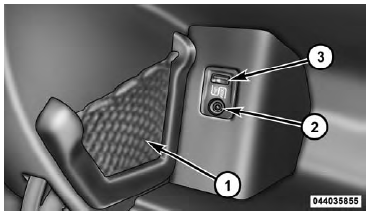
1 — iPod Or External USB Device Holder
2 — Cable Jack
3 — USB Connector
Refer to the appropriate Blue&Me™ radio User’s Manual for iPod or external USB device support capability.
See also:
Rev counter
Rev. counter B-fig. 33 - 34 shows engine rpm.
IMPORTANT
The electronic system progressively blocks fuel flow to prevent engine from overrevving.
This will lead to a progressive loss of engine po ...
General Information
This device complies with Part 15 of FCC rules and with RS-210 of Industry Canada.
Operation is subject to the following conditions: 1. This device may not cause harmful
interference.
2. This dev ...
7. Turn Signal Indicators
The arrows will flash in unison with the exterior turn signal, when using the
turn signal lever. ...