


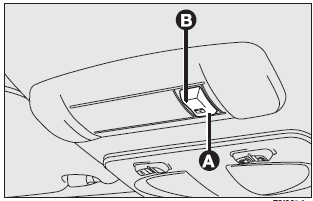
It is controlled electrically and it will only work when the ignition key is at MAR.
Sunroof is controlled by a switch. When you release it the roof locks in the position it is at that moment.
SUNROOF OPENING
Full opening
Press switch to (A) (symbol).
“Spoiler” position
Press switch to (B), this is only possible when the roof is closed.
SUNROOF CLOSING
Press switch to (B). Press to (A) (symbol) when the roof is in spoiler position.
A sliding sunshade is fitted to lessen the effect of sun rays in the passenger compartment.
EMERGENCY OPERATION
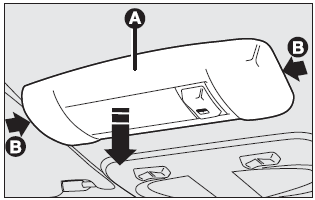
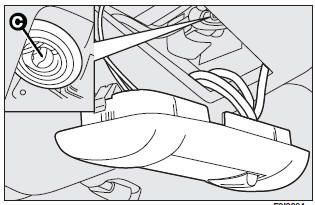
If the switch does not work, the sunroof can be operated manually as follows:
❒ remove (A) operating from points (B) shown by the arrows;
❒ insert the screwdriver provided into (C);
❒ when fully open, turn the screwdriver half a turn back until it clicks, then remove
the screwdriver.
Do not open the sunroof if there is snow or ice on it: it could be damaged.
WARNING
When leaving the car, the ignition key should be removed to prevent the sunroof from being operated inadvertently and harming anyone remaining in the car. Improper use of the sunroof can be dangerous. Before and during its operation ensure that any passengers are not at risk from the moving roof either by personal objects getting caught in the mechanism or by being injured by it directly.
See also:
Chassis
...
Engine codes - bodywork versions
EUROPEAN HOMOLOGATION
HOMOLOGATION FOR SPECIFIC MARKETS
EUROPEAN HOMOLOGATION
HOMOLOGATION FOR SPECIFIC MARKETS
EUROPEAN HOMOLOGATION
HOMOLOGATION FOR SPECIFIC MARKETS
EUROPEAN HOMOL ...
CD MP3 Player
Introduction
This chapter describes the operation of the CD MP3 player.
NOTE: Layer-3 audio decoding technology is licensed from Fraunhofer IIS and Thomson
multimedia.
MP3 Mode
In addition to p ...