


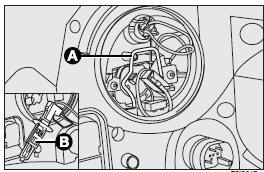
To change the bulb, remove the protective cover (1), release the catch (A) and remove the bulb (B).
See also:
“Dualdrive” electric power steering failure
Turning the ignition key to MAR the warning light on the dial turns on, but it
should go off after few seconds.
If the warning light stays on (on certain versions together with the message
on ...
Fuel cut-off switch (FIS)
It is located under the dashboard on the front right-hand door pillar and it
comes into operation in the case of an accident to block the supply of fuel thereby
stopping the engine.
Carefully i ...
External light failure
The warning light on the dial comes on (on certain versions together with the
message on the display) when a failure is detected to one of the following lights:
taillights, brake lights (3rd ...