


The system set-up, combined with radio consists of:
❒ dual-purpose aerial (sound system + cellular phone 900/1800 MHz), on the car
roof;
❒ dual-purpose connection wires and ten-pin connector wiring.
The connector is located between the steering column and the central console.
Cellular phone set-up combined with sound system set-up, consists of:
❒ dual-purpose aerial (sound system + cellular phone 900/1800 MHz), on the car
roof;
❒ dual-purpose speaker (sound system + cellular phone), on passenger’s door;
❒ dual-purpose connection wires and ten-pin connector wiring.
The connector is located between the steering column and the central console.
The hands-free telephone you purchase will need to be compatible with your cellular telephone.
WARNING
The maximum power applicable to the aerial is 20W.
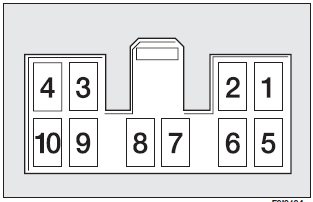
The wiring diagram is the following:
1 Sound system MUTE function
2 Spare
3 Cellular phone INPUT earth signal (*)
4 Cellular phone INPUT signal (*)
5 Dual-purpose speaker on passenger’s door (+) (**)
6 Dual-purpose speaker on passenger’s door (–) (**)
7 Ignition switch power (+15)
8 Spare
9 Battery power (+)
10 Earth
(*) Sound system.
(**) Sound-system set-up.
We recommend installing the microphone near the front ceiling light.
Have the cellular telephone and the connections to the system installed by a Fiat Dealership only. This will ensure the best results and prevent problems which could affect the car safety.
See also:
Air bag failure
(red) (where provided)
Turning the ignition key to MAR the warning light turns on, but it should go
off after few seconds.
The warning light stays on glowing steadily if there is a failure in th ...
Supplemental Side Air Bag Inflatable Curtain(SABIC)
Supplemental Side Air Bag Inflatable Curtains (SABIC) may offer side-impact protection
to front and rear seat outboard occupants in addition to that provided by the body
structure. Each air bag fe ...
General instructions
❒ When a light is not working, check that the corresponding fuse is intact before
changing a bulb. For the location of fuses, refer to the paragraph “If a fuse blows”
in this section;
...