


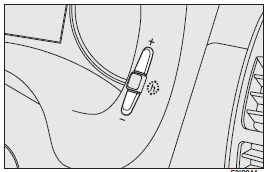
To adjust the time, press button (+) to increase minutes, button (–) to decrease minutes. Every press on the button increases or decreases by one unit. Keeping the corresponding button pressed obtains automatic fast increase or decrease. When you are near the required value, release the button and complete adjustment with single presses.
See also:
Low battery charge
Turning the key to MAR the warning light on the dial turns on, but it should
go out as soon as the engine is started (with the engine running at idle speed a
brief delay in going out is allowed) ...
(B) Setting Up To Use TIREFIT
1. Turn the Mode Select Knob (5) to the Sealant Mode position.
2. Uncoil the Sealant Hose (6) and then remove the cap from the fitting at the
end of the hose.
3. Place the TIREFIT kit flat on the ...
Using the rear central seat belt
Seat belt without reel mechanism
To fasten the seat belt: insert the tongue (A) into the buckle (B), until you
hear it click.
To unfasten the seat belt: press button (C).
To adjust the belt: sl ...