


Clean the rubber edges of the wiper blades and the windshield periodically with a sponge or soft cloth and a mild, nonabrasive cleaner or use the washer solvent. This will remove accumulations of salt, waxes or road film and help reduce streaking and smearing.
Operation of the wipers on dry glass for long periods may cause deterioration of the wiper blades. Always use washer fluid when using the wipers to remove salt or dirt from a dry windshield. Avoid using the wiper blades to remove frost or ice from the windshield. Make sure that they are not frozen to the glass before turning them on to avoid damaging the blade. Keep the blade rubber out of contact with petroleum products such as engine oil, gasoline, etc.
 NOTE: Life expectancy of wiper blades varies depending on geographical area and
frequency of use. Poor performance of blades may be present with chattering, marks,
water lines or wet spots. If any of these conditions are present, clean the wiper
blades or replace as necessary.
NOTE: Life expectancy of wiper blades varies depending on geographical area and
frequency of use. Poor performance of blades may be present with chattering, marks,
water lines or wet spots. If any of these conditions are present, clean the wiper
blades or replace as necessary.
Rear Wiper Blade Removal/Installation
1. Lift the pivot cap on the rear wiper arm upward, this will allow the rear wiper blade to be raised off of the liftgate glass.
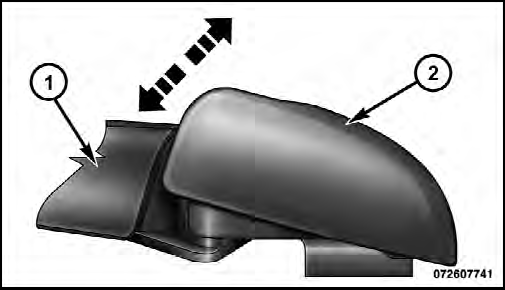
1 — Wiper Arm
2 — Pivot Cap
NOTE: The rear wiper arm cannot be raised fully upward unless the pivot cap is
raised first.
2. Lift the rear wiper arm upward to raise the wiper blade off of the liftgate glass.
3. Grab the bottom of the wiper blade and rotate it forward to unsnap the blade pivot pin from the wiper blade holder.
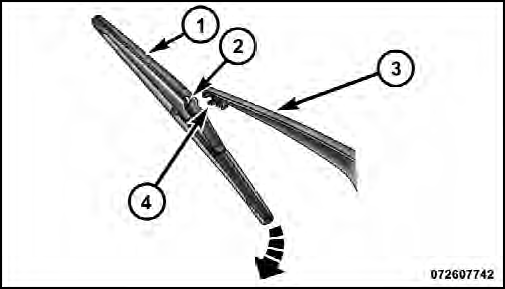
1 — Wiper Blade
2 — Blade Pivot Pin
3 — Wiper Arm
4 — Wiper Blade Holder
4. Install the wiper blade pivot pin into the wiper blade holder at the end of the wiper arm, and firmly press the wiper blade until it snaps into place.
5. Lower the wiper blade and snap the pivot cap into place.
See also:
Maintenance Procedures
The pages that follow contain the required maintenance services determined by
the engineers who designed your vehicle.
Besides those maintenance items specified in the fixed maintenance schedule,
...
Fuel reserve
Turning the ignition key to MAR, the warning light on the instrument panel shall
turn on but it should go off after a few seconds.
The warning light turns on (on certain versions together with ...
Fuel cut-off switch (FIS)
It is located under the dashboard on the front right-hand door pillar and it
comes into operation in the case of an accident to block the supply of fuel thereby
stopping the engine.
Carefully i ...