


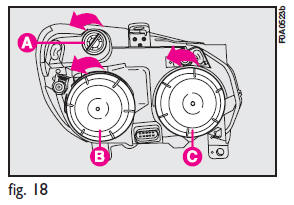
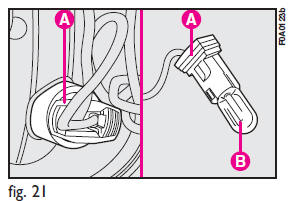
To change the bulb, proceed as follows:
1) Remove the protection cover B-fig. 18 turning it counterclockwise;
2) Press tabs A-fig. 21, remove the bulb holder from housing B and remove the bulb C (clipped in).
See also:
Automatic Dimming Mirror — If Equipped
This mirror automatically adjusts for headlight glare from vehicles behind you.
You can turn the feature on or off by pressing the button at the base of the mirror.Alight
to the left of the button ...
Jack Location
The jack and jack-handle are stowed in a bag under the front driver’s seat.
Jack Stowage ...
Lap/Shoulder Belt Untwisting Procedure
Use the following procedure to untwist a twisted lap/ shoulder belt.
1. Position the latch plate as close as possible to the anchor point.
2. At about 6 to 12 in (15 to 30 cm) above the latch plate, ...