


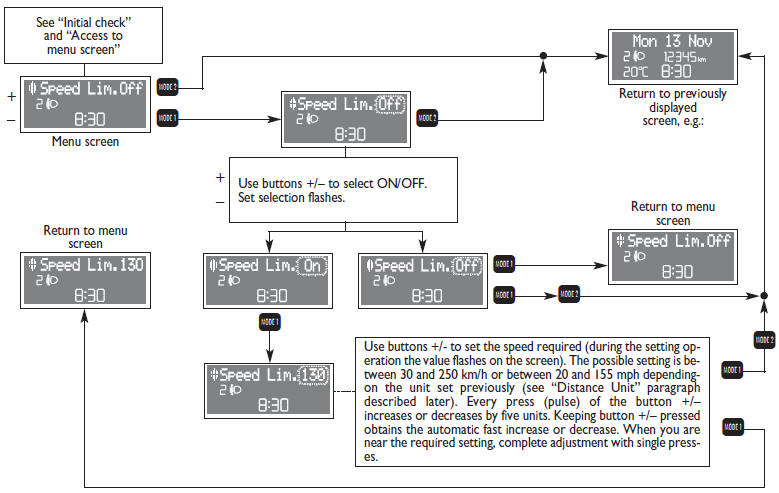
With this function it is possible to set the car speed limit which, if exceeded, automatically sounds a buzzer and makes the warning light è with the special message on the display (see “Warning lights and messages” section) come on to alert the driver. To set the speed limit, proceed as follows:
See also:
1. Glow Plug Light — If Equipped
The Glow Plug light will flash during engine oil viscosity sensor measurement
in cold weather.
During this measurement (up to 10 seconds), the starter will be disabled. If
the measured oil visc ...
Environment and economy
The Fiat Doblò will be launched with four engines with 5 or 6 speed
gearboxes, all designed and made by FPT - Fiat Powertrain Technologies:
1.3 Multijet II 16v - 90 HP (Euro 4);
1.6 Multij ...
Power Door Locks
A power door lock switch is incorporated into the door handle. Push or pull the
handle to lock or unlock the doors and liftgate. If the door handle is pushed a
red lock indicator will show on the ...