


With toggling lens
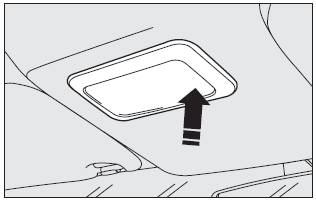
The light will come on automatically when a front door is opened and go out when the door is closed.
Press the short side of the lens to switch the light on and off when the doors are closed, as shown in the figure.
With map reading lights
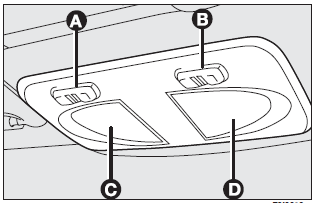
Press switch (A) to switch the light on and off.
Switch (B) operates the map reading light.
With switch (A) in central position, lights (C) and (D) will come on/off when doors are opened/closed.
With switch (A) pressed to the left, lights (C) and (D) are off and they will not come on when doors are opened.
With switch (A) pressed to the right, lights (C) and (D) will come on regardless of the position of the doors.
On certain versions, lights come on/off gradually.
With light off, switch (B) turn on the following lights:
❒ map reading light (C) if pressed to the left;
❒ map reading light (D) if pressed to the right.
IMPORTANT Make sure that both switches are in central position before getting out of the car. This ensures that lights go out when the doors are closed preventing the battery from running down.
Ceiling light timing
Two timing strategies are available on certain versions, in order to facilitate getting in and out of the car, especially at night in dark areas.
Timing for getting into the car
The ceiling lights will come on as follows:
❒ for about 10 seconds when the front doors are unlocked;
❒ for about 3 minutes when one of the side doors is opened;
❒ for about 10 seconds when a door is closed (within the three minutes).
Timing will be stopped when the ignition key is turned to MAR.
Timing for getting out of the car
The ceiling lights will come on as follows when the key is removed from the ignition switch:
❒ for about 10 seconds within two minutes after stopping the engine;
❒ for about 3 minutes when one of the side doors is opened;
❒ for about 7 minutes when a door is closed (within the three minutes).
The timeout will automatically end when the doors are locked.
See also:
Wheels
RIMS AND TYRES
Pressed steel or alloy rims. Tubeless tyres with radial carcass. The homologated
tyres are listed in the Log book.
IMPORTANT In the event of discrepancies between the information ...
If an exterior light burns out
Alterations or repairs to the electric system not carried out correctly and
without taking into account the system specifications may cause failures and the
risk of fire.
See “If a bulb burns ou ...
26. Odometer / Trip Odometer / Electronic VehicleInformation Center (EVIC) Display
Area
This display indicates the total distance the vehicle has been driven.
U.S. Federal regulations require that upon transfer of vehicle ownership, the
seller certify to the purchaser the correct mile ...