


Press switch A-fig. 90 to switch the lights on and off.
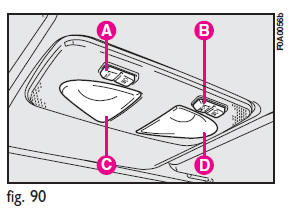
Switch B operates the map-reading light.
According to the position, you can have the following conditions:
– switch A pressed at the centre, ceiling lights C and D will come on regardless of the position of the doors;
– switch A pressed to the left, ceiling lights C and D will stay off regardless of the position of the doors;
– switch A pressed to the right, ceiling lights C and D will stay on in whatever condition.
When the ceiling light is off, switch B turns on the following lights:
– map-reading light C if pressed to the left;
– map-reading light D if pressed to the right.
IMPORTANT
Make sure that both switches are in central position before getting out of the vehicle. This is ensure that the ceiling lights go out when the doors are closed preventing the battery from running down.
Timing for getting into the vehicle
The ceiling lights will come on as follows:
– for 15 seconds when the front doors are unlocked;
– for 7 seconds when a door is closed (within the three minutes).
Timing will be stopped when the ignition key is turned to MAR.
Timing for getting out of the vehicle
The ceiling lights will come on as follows when the key is removed from the ignition switch:
– for 3 minutes within two minutes after stopping the engine;
– for 7 seconds when a door is closed (within the three minutes).
Timing will be stopped when the doors are locked.
See also:
ABS intervention
It is signalled by the blinking of the warning light á on the instrument panel,
to inform the driver that the car is in critical stability and grip conditions. ...
Supplemental Driver Side Knee Air Bag
The Supplemental Driver Side Knee Air Bag provides enhanced protection and works
together with the Driver Advanced Front Air Bag during a frontal impact. ...
Annual inspection schedule
For vehicles with an annual mileage of below 20.000 km (for example about
10.000 km) the following yearly inspection programmed is advised:
– check tyre conditions/wear and adjust pressure if requi ...