


To further protect your vehicle from theft, it has been fitted with an engine immobilising system (Fiat CODE system) which is automatically activated when the ignition key is removed.
An electronic device, in fact, is fitted in each ignition key grip. The device transmits a radio-frequency signal when the engine is started through a special aerial built into the ignition switch. The modulate signal, which changes each time the engine is started, is the password by means of which the control unit recognises the key and enables to start the engine.
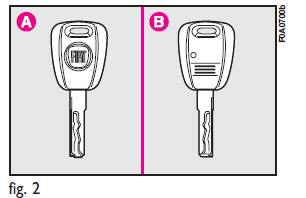
KEYS fig. 2
The following keys are provided with the vehicle:
– two keys A when the vehicle is not equipped with remote control;
– key A and key B when the vehicle is equipped with door lock remote control.
– Key A is the key that is used normally.
It will:
– start the engine;
– lock/unlock front doors;
– lock/unlock the rear doors or the tailgate;
– lock/unlock the side doors, Cargo versions only;
– deactivate the passenger’s airbag.
The key B, with a built-in remote control, has the same functions as key A in vehicles with door lock remote control.
The CODE card fig. 3 is also supplied with the keys and bears the following:
a - the electronic code to be used for emergency starting (see “Emergency start-up” in section “In an emergency”);
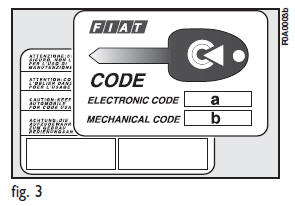
b - the mechanical key code to be given to the Fiat Dealership when ordering duplicate keys.
Keep the CODE card in a safe place.
Make sure you have the electronic code of the CODE card with you at all times in the event you have to perform an emergency start-up.
See also:
Pinch Protect Override
If a known obstruction (ice, debris, etc.) prevents the sunroof from closing,
press the switch forward and hold for approximately one second after the reversal
occurs.
This allows the sunroof to ...
Extending the boot
Split seat
Before setting off, make sure that the seats in the direction of travel and perfectly
fastened to the anchoring. Only in this position can be seat belts be used correctly.
The boot can ...
22. Electronic Stability Control (ESC) Activation /Malfunction Indicator Light
The ESC Activation/Malfunction Indicator Light in the instrument cluster will
come on for four seconds when the ignition switch is turned to the ON/RUN position.
If the ESC Activation/Malfunctio ...