


Front
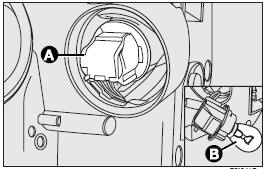
To change the bulb, remove the protective cover (3), turn connector (A) clockwise and remove the bulb (B).
Side
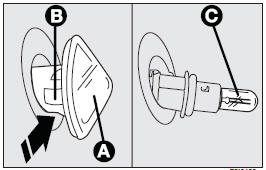
To change the bulb, proceed as follows:
❒ Press the lens (A) in the direction of the arrow (opposite to running direction)
so to compress the clip (B) and remove the cluster;
❒ Turn the lens (A) counterclockwise and remove it; then remove the snap-fitted
bulb (C).
FRONT FOG LIGHTS
Go to a Fiat Dealership to have bulbs replaced.
See also:
SOUND system
Large oddment compartments in the dashboard and doors which make the passenger
compartment even more comfortable can be fond in cars not equipped with a sound
system set-up.
A specific kit can be ...
Annual inspection schedule
For cars with an annual mileage of below 20,000 km (for example about 15,000
km) the following yearly inspection programme is advised:
❒ check tyre conditions/wear and adjust pressure if req ...
Sunroof
It is controlled electrically and it will only work when the ignition key is
at MAR.
Sunroof is controlled by a switch. When you release it the roof locks in the
position it is at that moment.
...