


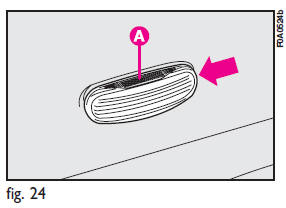
To change the bulb, proceed as follows:
1) Press the lens A-fig. 24 in the direction of the arrow so to compress the clip and remove the cluster.
2) Turn the bulb holder counterclockwise, remove the snap-fitted bulb and replace it.
See also:
With toggle lens
Press the short side of the lens fig.
91 to switch the light on and off.
...
Button volume (Keys Volume)
The volume of the roger-beep accompanying the activation of certain buttons can
be adjusted according to 8 levels. The roger-beep can be adjusted and excluded.
To adjust the volume proceed as foll ...
At the filling station
Make sure that the left-hand sliding side door is completely closed before
refueling. You could damage the door and the sliding lock system which comes into
play when the fuel flap is open.
Y ...